Smart Home | Product Recommendations
An old television does not necessarily need to be replaced to deliver a modern entertainment experience. If your TV still produces a clear picture but lacks built-in streaming apps, reliable software updates, or convenient access to online content, a streaming device could be the upgrade you have been looking for. These compact gadgets connect to your television through an HDMI port and bring services such as Netflix, YouTube, Prime Video, Disney+, and other compatible platforms to your screen. Depending on the model, they can also introduce voice search, personalised recommendations, smart-home controls, and improved access to high-resolution content.
The appeal of streaming devices goes beyond convenience. Buying a new smart television can be expensive, especially when your existing screen still meets your everyday viewing needs. A streaming stick or media box offers a more affordable way to modernise your setup without changing your entire entertainment system. However, not every device delivers the same experience. Some prioritise premium picture quality, others focus on simplicity and value, while a few stand out for their operating systems, app selection, or integration with other gadgets. From Apple’s polished entertainment ecosystem to Roku’s straightforward interface and Google’s personalised recommendations, these six streaming devices deserve a closer look.
1. Apple TV 4K: A Premium Upgrade for a More Connected Home
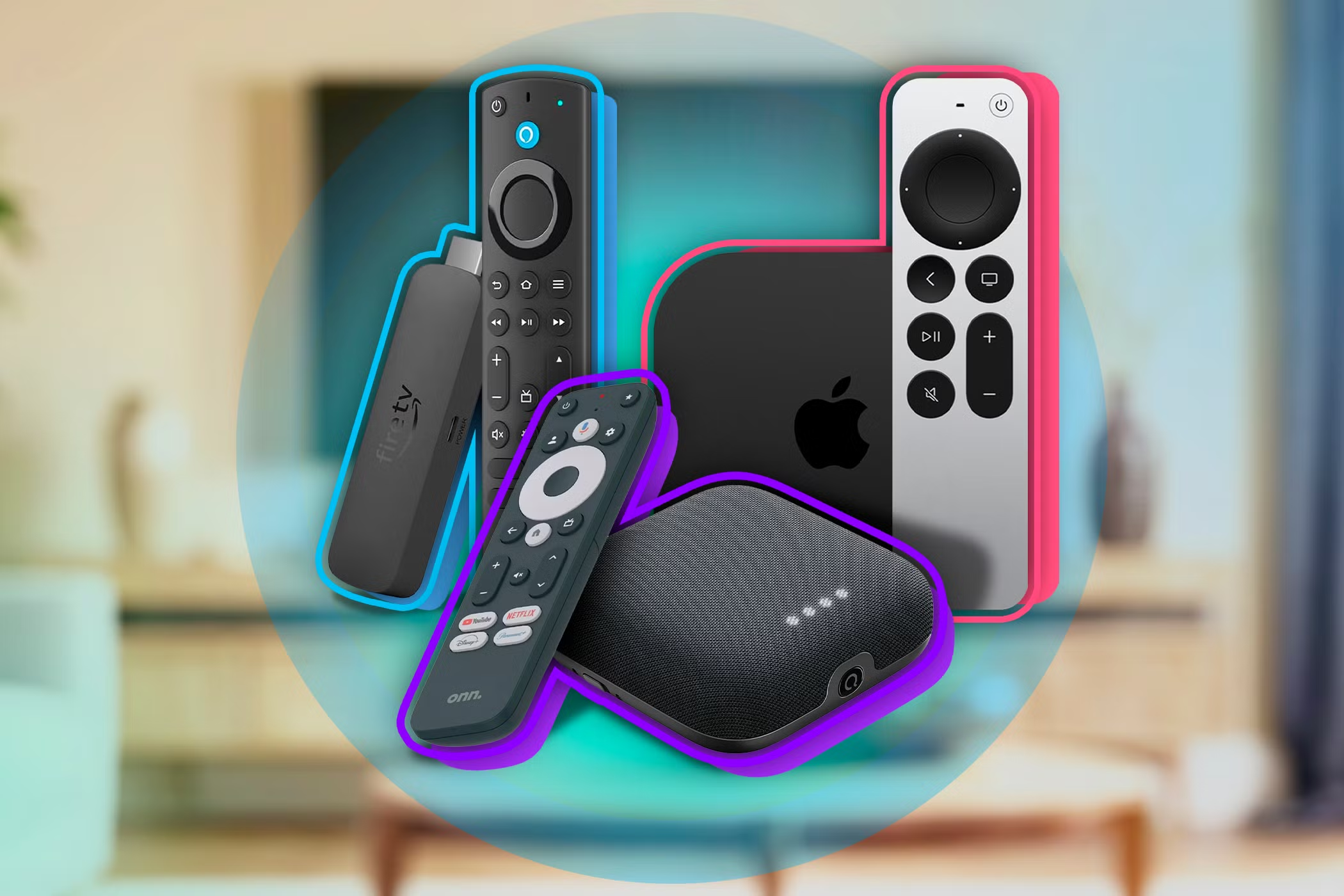
For viewers who value a polished interface, dependable performance, and a well-integrated entertainment ecosystem, the Apple TV 4K is one of the most compelling streaming devices available. Rather than simply adding streaming apps to an older television, it aims to create a seamless viewing experience with smooth navigation, convenient search, and access to compatible entertainment services. Its compact box connects to a TV through HDMI and supports high-resolution streaming on compatible displays. For households already using Apple products, its integration with services and features such as AirPlay can make sharing photos, videos, and other content across devices especially convenient.
Picture and sound quality are important parts of its appeal. Supported Apple TV 4K models offer features such as Dolby Vision and Dolby Atmos, although the complete experience depends on the television, audio equipment, streaming service, and content being used. Its interface is designed to make moving between apps feel effortless, while Siri can help users search for shows, movies, and other entertainment. Apple TV also provides access to Apple TV+, Apple Music, Apple Arcade, and other compatible apps, making it more than a conventional streaming stick.
The main consideration is cost. Apple TV 4K generally sits in the premium segment of the streaming-device market, so it may be more than necessary for someone who only wants basic access to YouTube and a few streaming subscriptions. Nevertheless, for users seeking a responsive media player, strong ecosystem integration, and a refined interface, it can be a worthwhile long-term investment. It is particularly attractive to households that already own an iPhone, iPad, or other Apple devices and want their television to become a natural extension of that connected environment.
2. Roku Streaming Stick: Simple Streaming Without the Complications
Not everyone wants a complicated entertainment system filled with settings, recommendations, and features they may never use. The Roku Streaming Stick family appeals to viewers who prefer a straightforward interface and an easy way to access their favourite streaming apps. Designed to connect directly to an HDMI port, compatible models can sit discreetly behind the television, reducing visible cables and keeping the setup neat. Once connected to Wi-Fi and configured, the device provides a central place to browse supported streaming services instead of navigating the limitations of an older television’s built-in software.
One of Roku’s biggest strengths is its emphasis on simplicity. The interface makes it easy to move between entertainment apps, browse available content, and discover viewing options without needing to understand an elaborate operating system. Depending on the model and market, users can access a broad selection of streaming channels, free ad-supported content, and subscription-based services. The Roku mobile app also offers useful controls and listening features on supported devices, although availability can vary by region and software version.
Roku is particularly appealing to households upgrading a secondary television in a bedroom, guest room, or rented apartment. Instead of investing in a completely new screen, users can add a streaming device and continue enjoying their existing television. However, buyers should compare the capabilities of individual Roku models carefully. Entry-level options may not offer the same resolution, HDR support, or performance as higher-tier versions, and Roku hardware is not officially available through the same channels in every country. For shoppers in international markets, checking local availability and app compatibility before purchasing is essential. When simplicity, accessible navigation, and everyday streaming are the priorities, Roku remains a strong option to consider.
3. Amazon Fire TV Stick 4K: A Feature-Rich Choice for Everyday Entertainment
The Amazon Fire TV Stick 4K is designed for viewers who want a compact device with extensive streaming options, voice control, and support for modern picture and sound formats. It plugs into an HDMI port and connects to the internet, giving an older compatible television access to a wide range of entertainment apps. Its remote includes Alexa voice control, allowing users to search for films, launch supported applications, and perform certain smart-home tasks without typing every search manually. For people who regularly switch between streaming platforms, this can make the viewing experience more convenient.
The device’s appeal extends beyond its size. Depending on the specific generation, Fire TV Stick 4K models support features such as 4K Ultra HD playback, Dolby Vision, HDR10+, and Dolby Atmos. These capabilities can improve the experience when paired with compatible televisions, content, and sound systems. The Fire TV interface also brings together apps, recommendations, and content discovery, helping viewers find something to watch without opening every service individually. Integration with Amazon’s ecosystem is another advantage, especially for households that already use Alexa-enabled speakers, smart lights, or other compatible devices.
However, buyers should understand that the interface includes Amazon content recommendations and promotional placements, and the overall experience may feel busier than a more minimal streaming platform. Some features also depend on the user’s location, subscription services, and specific device generation. A reliable internet connection remains necessary for smooth streaming, and owning the stick does not automatically include paid subscriptions to every entertainment platform. For users who want a versatile streaming device with voice assistance, modern format support, and convenient access to popular apps, the Fire TV Stick 4K offers a practical balance of features and affordability.
4. Google TV Streamer: Personalised Recommendations and a Smarter Viewing Experience
For viewers who spend more time deciding what to watch than actually watching it, Google’s streaming ecosystem offers a useful approach to content discovery. The Google TV Streamer brings compatible streaming applications together through an interface that highlights recommendations, watchlists, and entertainment from different services. Rather than treating every app as a separate destination, it helps users discover movies and television shows through a more unified home screen. This can be especially useful for households with multiple subscriptions and different viewing preferences.
Unlike the small, stick-shaped designs associated with many streaming products, the Google TV Streamer uses a compact set-top-box form factor. It connects to the television through HDMI and offers 4K HDR streaming with support for formats including Dolby Vision and Dolby Atmos on compatible setups. Its interface can incorporate viewing recommendations based on available services, while Google Assistant enables voice searches and certain smart-home commands. Users can also take advantage of Google Cast-compatible apps to send supported content from a phone or tablet to the television.
Another advantage is its connection to Google’s wider smart-home ecosystem. The device can work as a hub for compatible Matter and Thread smart-home products, depending on the setup and supported features. This gives it potential value beyond entertainment for people who want to control compatible connected devices from a central location. Still, its higher price compared with basic streaming sticks may not suit everyone, and the benefits of its smart-home capabilities depend on the devices already installed at home. Buyers should also confirm that their preferred apps and services are supported in their region. For anyone looking for personalised entertainment recommendations alongside a more connected living-room experience, Google TV Streamer is an option worth considering.
5. Chromecast With Google TV: A Compact Solution for Flexible Streaming
Although Google has moved its newer hardware strategy towards the Google TV Streamer, Chromecast with Google TV remains an important option in the streaming-device conversation, particularly for shoppers considering used, refurbished, or previously purchased hardware. It combines Google’s content-discovery interface with the convenience of a small HDMI-connected device, making it suitable for televisions that lack modern streaming software. The familiar Chromecast concept also allows supported apps to cast content from a phone, tablet, or computer, while the Google TV interface and remote provide a more traditional television-based experience.
One reason Chromecast with Google TV became popular was its flexibility. Users could browse available entertainment directly on the screen rather than relying exclusively on a mobile device to control playback. The interface organises content and offers recommendations across compatible services, while voice search can make it easier to find a specific film or show. Depending on the version, the device supports either HD streaming or 4K playback, so buyers should distinguish between the two before making a purchase. The 4K model is more appropriate for a compatible UHD television, while the HD version may be sufficient for older 1080p screens.
Its limitations are worth considering. Chromecast with Google TV is an older product line, and availability of new units, future software support, and regional service compatibility should be checked carefully. Refurbished products can offer value, but buyers should pay attention to the seller’s reputation, device condition, included remote, and return policy. Storage limitations and connectivity needs may also matter for users who install many applications. For households that already own a Chromecast with Google TV, it can still provide a convenient way to modernise an older television. For new buyers, however, comparing its price and remaining support with the newer Google TV Streamer is a sensible first step.
6. NVIDIA Shield TV Pro: A Powerful Option for Streaming and Advanced Home Entertainment
For technology enthusiasts who want more than basic streaming, the NVIDIA Shield TV Pro occupies a distinctive position in the media-player market. It is designed for users who value flexible playback, powerful processing, and advanced entertainment features. Alongside access to supported streaming applications, the device offers Android TV-based functionality, Chromecast built-in, and support for compatible media-server and network-streaming setups. This makes it especially attractive to people who maintain personal movie libraries, use a home media server, or want more control over how digital entertainment is organised and played.
One of its most recognised features is AI-enhanced upscaling, which can improve the perceived sharpness of supported lower-resolution video when displayed on a compatible high-resolution television. It does not turn ordinary HD footage into native 4K content, but it can make certain material appear clearer. The Shield TV Pro also supports selected advanced audio and video formats, with the final results depending on the television, receiver, sound system, app, and media file. For viewers with a capable home cinema setup, these features can provide more flexibility than an entry-level streaming stick.
The device is not necessarily the right choice for every household. Its premium positioning means that casual viewers who mainly watch a few streaming apps may find better value in a simpler and less expensive alternative. Its larger design also requires more space than an HDMI stick, while some advanced capabilities demand additional configuration or compatible equipment. Even so, for enthusiasts who want a versatile streaming player, access to personal media libraries, and features that support a more sophisticated entertainment setup, the Shield TV Pro remains worth evaluating. Its greatest strength is not merely adding apps to a television, but giving users more control over their wider digital media experience.
How to Choose the Right Streaming Device for Your Old Television
Choosing the best streaming device starts with understanding the television you already own. Check whether it has a working HDMI port, because the six devices discussed here rely on HDMI for video output. If your television is older and lacks HDMI, you may need a compatible converter, but such adapters can introduce limitations and are not guaranteed to work with every device. You should also identify the screen’s native resolution. A 4K streaming device can connect to many HD televisions, but the picture will not become 4K simply because the device supports it. The television’s capabilities determine the maximum resolution it can display.
Your internet connection and subscription preferences are equally important. Streaming in high quality requires sufficient bandwidth and a stable Wi-Fi signal, particularly when multiple people use the network simultaneously. Ethernet connectivity may be useful for setups that prioritise a more consistent connection, but support varies by device and may require an adapter. Before buying, check whether the apps you use most frequently are supported in your country and whether your chosen streaming services charge separate subscription fees. A device’s purchase price is only one part of the total entertainment cost.
Finally, think about how you prefer to watch television. Apple TV 4K is attractive to users who value premium performance and Apple’s connected ecosystem. Roku focuses on straightforward navigation, while Amazon Fire TV Stick 4K combines compact hardware with Alexa voice control. Google TV Streamer offers personalised discovery and additional smart-home possibilities, Chromecast with Google TV remains relevant for existing owners and carefully chosen refurbished purchases, and NVIDIA Shield TV Pro appeals to users seeking advanced media playback. The best option is the one that matches your habits, budget, and equipment rather than the model with the longest feature list.
The Verdict: Give Your Television a Second Life
A television does not have to be brand-new to feel modern. With the right streaming device, an older screen can become a practical entertainment centre for films, television series, online videos, music, and compatible smart-home features. For many households, this approach offers a way to extend the useful life of existing electronics while avoiding the cost and inconvenience of replacing a television that still works well.
The key is to choose a device that complements your needs. A premium media box may be worthwhile for a dedicated home cinema, while a compact streaming stick could be all you need for everyday viewing. Consider app availability, software support, resolution, connectivity, and total cost before making your decision. With those factors in mind, upgrading your old television can be a relatively simple step towards a more convenient and connected entertainment experience.